
267 - Navigational Nirvana

Hi there, eMagiz developers! This release includes significant improvements regarding navigation options within the Create phase. This includes improvements in navigating between flows and in creating context between properties and flows. On top of that, it introduces a structured and simple way to navigate to our API MAM functionality for all models using the API Pattern in combination with the OAuth security option. Subsequently, we have also launched a new runtime image for all customers. Enjoy reading our latest updates on the platform.
Runtime Image - Announcement
We have released a new runtime image to our community.
Flow Designer Navigation
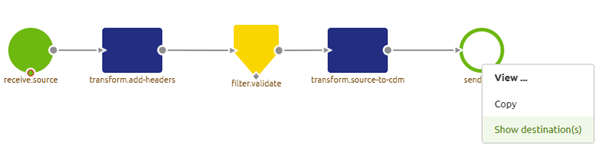
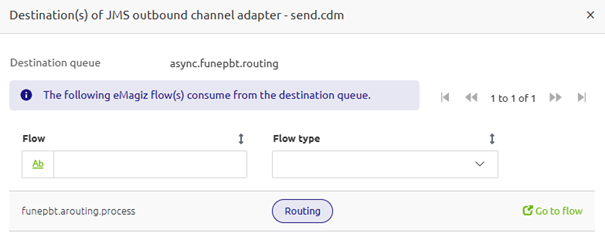
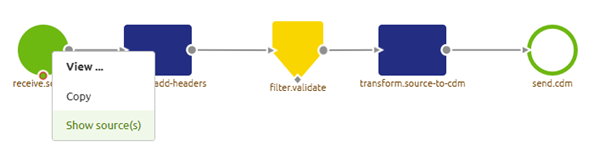
Users can now navigate between flows using JMS and Kafka components. Navigation is based on the configured destination (for JMS) or topic (for Kafka) defined on each component, allowing quick access to related flows. This functionality extends and improves the platform's current flow navigation. The pictures below illustrate how to navigate between flows.
API Authentication Layer (API MAM) - Migration (OAuth)
To migrate to API MAM, we offer our customers who use OAuth as their security mechanism a tailor-made migration path comprising five straightforward steps, enabling them to migrate away from the old system quickly and with confidence. Once they run on API MAM, they can profit from the following improvements and new functionalities.
- Flexibility in selecting the chosen authentication mechanism on a per-user basis.
- Improved user management
- Improved graphs
Create - Properties Overview
The Properties tab in the Create phase is introduced. The tab now displays all properties, and selecting a property reveals a list of flows that use it. From this list, you can navigate directly to a specific flow by double-clicking it or by clicking the Go to Flow icon on the right side of the row. This allows you to identify better the impact of a property change on your model, as it quickly identifies the flows in which a property is used.

Bug Fixes
Create - Add Integrations
Trying to add an integration to a system without applying its settings in Design Architecture shows an informative message.
Create - Flow Designer
Fixed the issue of no longer being able to add headers to an XPath Header Enricher introduced with the previous release.
Fancy Forum Answers
As always, this is a gentle reminder to ask questions via the Q&A forum in the eMagiz iPaaS portal. This way, we can all benefit from the community's knowledge.
Key Takeaways
Thanks to all who helped build the product and those who tested and provided feedback to improve it. To end this post, here are some key takeaways for you:
- If you have questions surrounding our roadmap, please get in touch with productmanagement@emagiz.com
- If you have feedback or ideas for us, talk to the Platypus
- Please inform us of new additions to the store (productmanagement@emagiz.com) so we can all benefit from these.
- Clear your browser cache (Ctrl + Shift + Del)
- Check out the release notes here
- Start thinking about how the license tracker can aid your development
- Start thinking about major, minor, and patch
- Keep making great integrations
Let's stay in touch and till next time!