
intermediate-data-handling-base64-decoding
Version 8.1 by marijn on 2022/05/17 08:52
Base64 decoding
Most of the time, you can use the standard tooling of eMagiz to manipulate the data so that it makes sense for the (external) party that receives the data. However, sometimes there are cases in which you need a little bit of extra complexity. This microlearning will explain one of those more complex scenarios. In this microlearning, we will learn how to use base64 decoding on your (input) message. This functionality is beneficial when the message is encoded, but you need to manipulate part of the data.Should you have any questions, please get in touch with academy@emagiz.com.- Last update: August 26th, 2021
- Required reading time: 5 minutes
1. Prerequisites
- Basic knowledge of the eMagiz platform
2. Key concepts
This microlearning centers around base64 decoding. We mean turning the encoded string into a readable format that eMagiz can manipulate further downstream.Essential characteristics of this functionality are:- Decoding (and encoding) of base64 strings take up additional memory (up to 33%)
- Separate integration for the base64 strings apart from metadata is advisable
- The component in eMagiz needs a base64 encoded string as input
- Multiple times encoding and decoding in the same integration is not advisable
3. Base64 decoding
Most of the time, you can use the standard tooling of eMagiz to manipulate the data so that it makes sense for the (external) party that receives the data. However, sometimes there are cases in which you need a little bit of extra complexity. This microlearning will explain one of those more complex scenarios. In this microlearning, we will learn how to use base64 decoding on your (input) message. This functionality is beneficial when the message is encoded, but you need to manipulate part of the data.Essential characteristics of this functionality are:- Decoding (and encoding) of base64 strings take up additional memory (up to 33%)
- Separate integration for the base64 strings apart from metadata is advisable
- The component in eMagiz needs a base64 encoded string as input
- Multiple times encoding and decoding in the same integration is not advisable
3.1 Implementation
To implement this logic, we need to add a separate component to our flow at the point where we want to decode the base64 string. This is generally part of your processing. The most logical place would be a flow associated with processing (i.e., onramp, exit gate, event processor).First, we need to navigate to the Create phase of eMagiz and open the flow in which we want to add this logic. Once you have opened your flow, you need to enter "Start editing" mode. This mode allows you to change the flow in question and add the logic to the transformation within the flow. When you have done so, it becomes time to add the base64 decode component to the flow.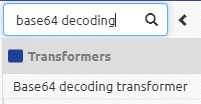
3.2 Use cases
Now that we know how to implement it, we can quickly look at possible use cases for this logic. We see this logic popping up mainly when dealing with attachments/files (i.e., pictures, pdf) within XML messages.Practice
4. Assignment
Look for places where you could use this logic to aid your integration process within your (Academy) project. This assignment can be completed with the help of your (Academy) project you have created/used in the previous assignment.5. Key takeaways
Essential characteristics of this functionality are:- Decoding (and encoding) of base64 strings take up additional memory (up to 33%)
- Separate integration for the base64 strings apart from metadata is advisable
- The component in eMagiz needs a base64 encoded string as input
- Multiple times encoding and decoding in the same integration is not advisable