
intermediate-mendix-connectivity-calling-an-asynchronous-queue-in-mendix
Version 17.1 by marijn on 2022/05/22 21:05
Calling an asynchronous web service in Mendix
With the help of the eMagiz Mendix module created by the eMagiz team, you can easily connect between Mendix and eMagiz for data integration. In this microlearning, we will focus on calling an asynchronous web service in Mendix.Should you have any questions, please get in touch with academy@emagiz.com.- Last update: October 29th, 2021
- Required reading time: 6 minutes
1. Prerequisites
- Intermediate knowledge of the eMagiz platform
- Access to a Mendix application
- Access to the Deploy phase of your eMagiz project
- A connection between Mendix and eMagiz Designed and Created
- Using eMagiz Mendix version 5.0.0 or higher.
2. Key concepts
This microlearning centers around calling an asynchronous web service in Mendix With eMagiz Mendix Connector, we mean: A Mendix module developed and maintained by eMagiz that simplifies connect a Mendix application to an eMagiz project for data traffic between both systems.To call an asynchronous web service in Mendix, you need the following:- Execute microflow (the microflow that will process the incoming data)
- Optionally, you can define an import mapping and subsequent option
3. Calling an asynchronous web service in Mendix
With the help of the eMagiz Mendix module created by the eMagiz team, you can easily connect between Mendix and eMagiz for data integration. In this microlearning, we will focus on calling an asynchronous web service in Mendix. For sending data to Mendix, we offer two options to send data:- Using the import mapping to send data to Mendix
- Sending a string message directly to Mendix
3.1 Sending asynchronous messages with import mapping
To send data to Mendix, you need to define several configuration options in the exit flow within the eMagiz portal. You want to connect your eMagiz solution to Mendix. In this example, we will look at the configuration for when you want to use the import mapping in Mendix. In the subsequent paragraph, we will take a closer look at how to configure the exit in case you do not want to use the import mapping.You will see the following overview within the exit flow, which you can configure (if in "Start Editing" mode). Here, you need to define the import mapping (complete name in Mendix including module name) and the execute microflow (complete name in Mendix including module name).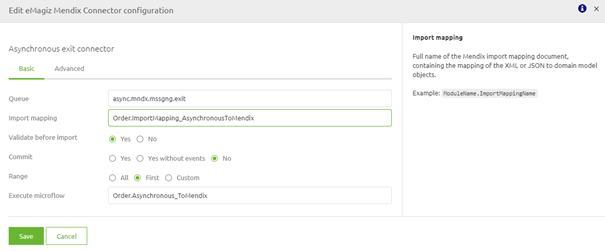
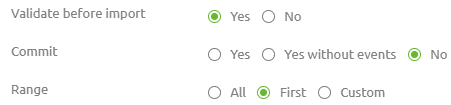
3.2 Sending asynchronous messages without import mapping
We just saw the example when working with the import mapping. Now we turn our attention to an instance without import mapping. In these cases, the string is just passed to the execute microflow, and you can determine in Mendix yourself what to do with it.You will see the following overview within the exit flow, which you can configure (if in "Start Editing" mode). Here you need to define the execute microflow (complete name in Mendix including module name).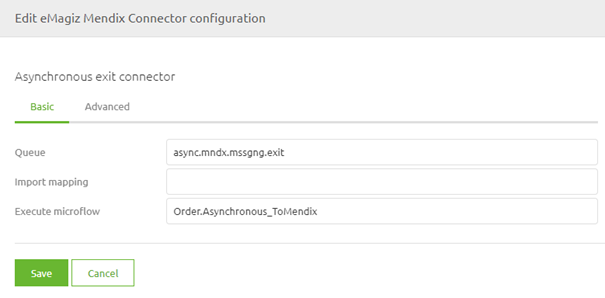
Practice
4. Assignment
The assignment is simple this time. Configure the exit flow to send data to Mendix correctly. Ideally, work on both options. This assignment can be completed with the help of an associated Mendix project linked to the (Academy) project that you have created/used in the previous assignment.5. Key takeaways
To call an asynchronous web service in Mendix, you need the following:- Execute microflow (the microflow that will process the incoming data)
- Optionally, you can define an import mapping and subsequent option
- Setting the Range option correctly is critical to prevent 'unexpected' errors