
intermediate-rest-webservice-connectivity-validation
Version 3.1 by marijn on 2022/05/22 21:16
Validation
In the previous microlearning, we learned how to configure a REST service. In this microlearning, we will discuss how you can validate whether the party calling your REST endpoint is sending the correct information in terms of the structure of the message. We will also learn how you can subsequently report back to the client that a validation error occurred.Should you have any questions, please get in touch with academy@emagiz.com.- Last update: September 8th, 2021
- Required reading time: 5 minutes
1. Prerequisites
- Intermediate knowledge of the eMagiz platform
2. Key concepts
This microlearning centers around validating incoming messages when hosting a REST web service. With REST, we mean: A web service that adheres to the RESTful principles With validation, we mean: Verifying whether the data structure we received is valid according to our definition- The external application pushes data to a REST web service (or API) hosted by eMagiz
- When doing so, the external application should adhere to the defined data structure
- If not, we need to refuse the call and respond with an error message
3. Validation
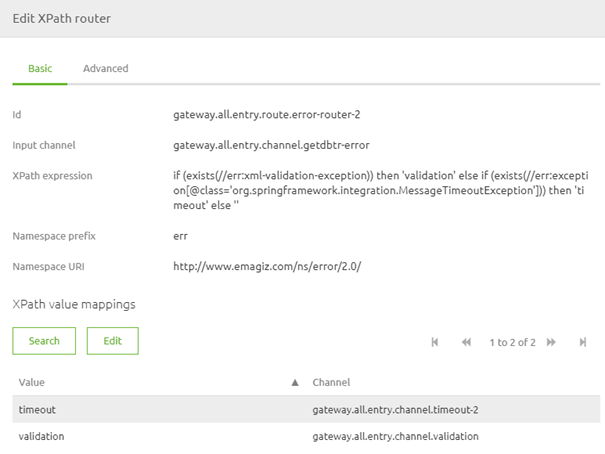
In the previous microlearning, we learned how to configure a REST service. In this microlearning, we will discuss how you can validate whether the party calling your REST endpoint is sending the correct information in terms of the structure of the message. We will also learn how you can subsequently report back to the client that a validation error occurred.As you might know from SOAP web services implementation, the validation is automatically handled when the endpoint is called. This works differently for REST endpoints hosted by eMagiz. Therefore we need a little bit more elbow grease to get things going. Depending on your use of messaging or API Gateway, you might need to add an XML validating filter to your solution. For example, when hosting the REST web services in the all-entry of a messaging solution, you want to validate before placing it on your asynchronous onramp queue. You want to add an XML validating filter in the exit gate before calling the external system for a passthrough API GW. Note that when you select the option transformation for the API Gateway, eMagiz will do this automatically.When adding or checking the XML validating filter, ensure that the checkbox (Throw an exception on rejection) is activated when the validation is done outside the all-entry.
Practice
4. Assignment
Navigate to a flow within your (Academy) project in which you host a REST Webservice. Ensure that when a validation error is thrown, eMagiz will return a proper response to the client. This assignment can be completed with the help of the (Academy) project that you have created/used in the previous assignment.5. Key takeaways
- The external application pushes data to a REST web service (or API) hosted by eMagiz
- When doing so, the external application should adhere to the defined data structure
- If not, we need to refuse the call and respond with an error message
- eMagiz auto generates a lot when using the API Gateway
- You need to recreate this when using the same functionality in a messaging flow