
intermediate-data-pipelines-job-dashboard-for-data-pipeline
Version 25.2 by marijn on 2022/06/09 12:36
Data pipeline * Job Dashboard
In this microlearning, we will learn what the Job Dashboard is, what the Job Dashboard tells you, and how the Job Dashboard works. With the help of such a data pipeline, you can transfer large volumes of data between Mendix and the SFTP for data warehousing / BI analytics purposes. The Job Dashboard gives you the ability to monitor if your process of transferring has succeeded or whether it failed.Should you have any questions, please contact academy@emagiz.com.- Last update: April 1th 2021
- Required reading time: 5 minutes
1. Prerequisites
- Basic knowledge of the eMagiz platform
- Basic knowledge of the Mendix platform
2. Key concepts
In this microlearning, we will learn what the Job Dashboard is, what the Job Dashboard tells you, and how the Job Dashboard works.With data pipeline we mean: A integration pattern that can transfer large volumes of data between a specific set of source and sink systems With Job Dashboard we mean: A overview within the context of eMagiz that shows management data (i.e. how many lines were processed, did the process run successfully) to the user3. Data pipeline * Job Dashboard
The Job Dashboard is an eMagiz dashboard that can be accessed via the Runtime Dashboard. On this level, you can select a specific flow and for that flow, you can retrieve the management data of your data pipeline by clicking on the button called Jobs.
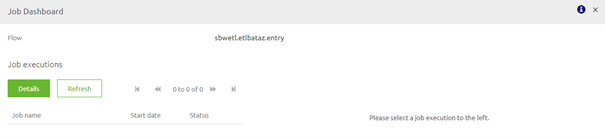
3.1 Explaining the inner workings of the Job Dashboard
By clicking on the Job dashboard you send a command to the flow you have selected in your runtime dashboard. This flow receives the command and thereby activates the job manager.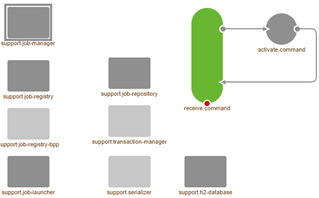
3.2 Clean up Job Dashboard
In the preconfigured flow that you have imported from the store, there is a segment in the right-hand corner that will ensure that your Job Dashboard will be cleaned up periodically. This piece of functionality will remove all jobs that ran more than one month ago. This way you ensure that the management data that is presented to you via the Job Dashboard is relevant and actual.In case you have an old data pipeline construction within your integration landscape I would suggest reading the following to see how you can build this functionality yourselves:[Migration Path * Job Dashboard Cleanup](../howto/migration-path-job-dashboard-cleanup.md)3.3 Best practices
- Create a separate H2 database per data pipeline you build within your project. For example, if you have 10 data pipelines you should create 10 separate H2 databases. As stated in the documentation of the store component:
- dp.h2.message.database; database name for the local h2 database (eg: "batch"). When using multiple pipeline flows on one container, consider renaming this property by replacing 'message' with the corresponding message type name in the 'support.h2-database' component.
- Clean up the H2 database periodically to keep its contents in check to prevent that the Job dashboard will stop functioning
- Use the Job dashboard in conjunction with the Manage phase to monitor and set up alerting surrounding the performance of the data pipeline solutions
Practice
4. Assignment
The assignment is simple this time. Navigate to the Runtime Dashboard and see if you have a Jobs button that you can press for your data pipeline runtime. If there is a button click on it so you can see the Job Dashboard with your own eyes.This assignment can be completed with the help of the (Academy) project that you have created/used in the previous assignment.5. Key takeaways
- The job dashboard is an overview within the context of eMagiz that shows management data (i.e. how many lines were processed, did the process run successfully) to the user
- Clean up the H2 database periodically to keep its contents in check to prevent that the Job dashboard will stop functioning
- Use the Job dashboard in conjunction with the Manage phase to monitor and set up alerting surrounding the performance of the data pipeline solutions
- You can import your data pipeline solution from the store